
Signed by your iPhone, checkable in any browser
A record only helps if the other side can trust it wasn’t edited. So the proof doesn’t rest on trusting us: the verify page redoes the math in the viewer’s own browser.
The sample record is built from sample data and signed with a test key.
What happens when you tap Done
The scan is fingerprinted and signed on the iPhone, then receipted by our server. Each step below starts with what it means for you.
-
Only the live camera gets in
Frames come straight from the camera during a guided scan. Nothing can be added from the camera roll.
-
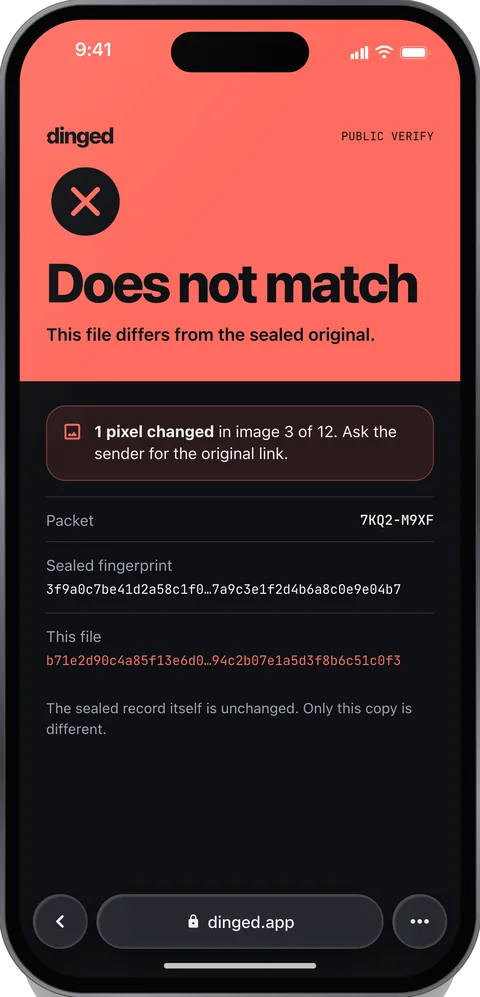
Change one pixel and that file no longer matches
Every file in the scan gets its own fingerprint.
Show the math
Every keyframe, depth map, pose file and pin list is hashed with SHA-256.
-
One value stands for the whole scan
Add, remove or swap any file and it stops matching.
Show the math
Fingerprints are sorted by path and combined into a Merkle tree. Its root stands for the whole scan.
leaf = SHA-256(0x00 ‖ file hash)node = SHA-256(0x01 ‖ left ‖ right)
-
Your iPhone signs it, with a key that can’t leave the phone
A scan re-signed on another phone shows up as a different signer.
Show the math
The manifest holds the root, the file list, device time, app version and, for a return or move-out, the previous scan’s manifest hash. It’s canonical JSON, signed with an ECDSA P-256 key that lives in the Secure Enclave and can’t be exported.
-
Our server signs a receipt with its own time
It checks the signature and signs a receipt, so the time doesn’t rest on your phone alone.
Show the math
The receipt signs the record ID, the manifest hash and the server’s time. The server’s public keys are published at
dinged.app/.well-known/
dinged-keys.json
What your browser checks
Scan the QR code on a record or open its link. No app, no account. The page uses the browser’s own WebCrypto.
Fingerprints
Fetches each image shown, recomputes its SHA-256 and compares it with the signed manifest.
Root
Recomputes the Merkle root from the file list.
Signature
Verifies the device’s ECDSA P-256 signature over the manifest.
Receipt
Shows the server receipt with both times, device and server.
Seal values from the sample record
- Files
- 19
- Merkle root
- 27e8962d6d7a17da…
- Manifest
- e93c1d7bab8224c2…
- Signature
- ECDSA P-256 · Secure Enclave
- Time
- Phone clock + signed server receipt
- Timestamp authority
- None yet
What the verify page can say
These are the page’s own banners. Until independent timestamps launch, every record that matches shows the second one.
Attacks the verify page has to catch
Before every release, we’ll run this list and publish the results on Accuracy, failures included. The one-pixel edit already works in today’s build.
| Attack | What the verify page shows |
|---|---|
| Edit one pixel of an image | “Does not match” on that image. Its fingerprint changed. |
| Swap in a frame from another scan | “Does not match.” The file isn’t in the signed manifest. |
| Replay an old scan as a new return or move-out | The previous-scan link and the receipt time show the real date. |
| Change the phone’s clock | Device and server times disagree. Gaps over 10 minutes are flagged. |
| Re-sign the scan on another phone | A different signer, not tied to the original account. |
| Edit the PDF | The PDF isn’t the evidence. The verify page shows the real values, and every PDF page says to check the online record. |
| Remove the receipt | “Verified, device time only.” |
What works today, and what’s next
Live now
- Sample record and its verify page, with the one-pixel tamper demo
- Live
In the development build
- On-device seal: SHA-256 fingerprints and Merkle root, with shared test vectors for the app and the web
- Working
- Secure Enclave ECDSA P-256 signing
- Working
- Server signature check and signed receipt
- Working
Not live yet
- Independent RFC 3161 timestamps on every root
- Coming next
- App Attest, so the server only accepts scans from the real app on a real iPhoneTest builds use a developer token.
- Coming next
- Results of the attack list, per release
- Not published
This covers the seal and the verify page. The status of the whole app is on Support.
Limits
- A seal shows a scan wasn’t changed after capture. It can’t show what was in front of the camera.
- Location is reported by the device and labeled that way.
- Until timestamps launch, the time comes from the phone’s clock, backed by our server’s signed receipt.
Found a security problem? Email support@dinged.app. What leaves your phone is in the privacy policy.